
Rounded corners are all the rage - and they have been for quite some time in web design. The way they "soften" up a design make them quite attractive to designers and decision-makers. Unfortunately, implementing rounded corners in a web page is not nearly as easy as it is to implement in a mockup using an image application.
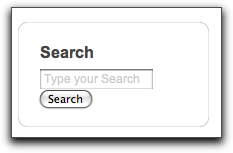
When talking about rounded corners, there are 2 distinct user cases to be considered - the first is when creating rounded corners only on the top corners of an area - this is commonly seen on tabs and block headers. The alternative use case is when all four corners of an area are rounded - this is usually seen in blocks and around content areas. This article will focus on the the case where all four corners need to be rounded. The result will be a method of adding the ability to optionally apply a rounded border to any block on your site in a way that doesn't break when the block is resized.
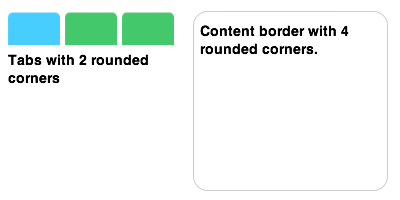
By the end of the article, you should be able to add this option to just about any Drupal theme - the relevant files you'll need are available for download at the end of this article.
I'll be using the Block Theme module to allow you to turn the border on and off for specific blocks - you might recall that this module was my pick-of-the-week in DrupalEasy Podcast 03.
While I can't guarantee that this method will work flawlessly with your theme, I can confirm that it works without modification in the Zen Classic (an included subtheme of the Zen theme) and Blueprint themes. In addition, I got it to work on the K2 theme with a single CSS tweak.
The method for actually building the rounded border in HTML and CSS was actually blatently borrowed (thanks!) from the Panels module. Another great example of not having to re-invent the wheel.
The first thing you're going to want to do is download and and enable Block Theme.

Next, navigate your way to the Block Theme settings page (admin/settings/blocktheme) and add "rounded|Rounded Border" to the "Custom Block Templates" text area.
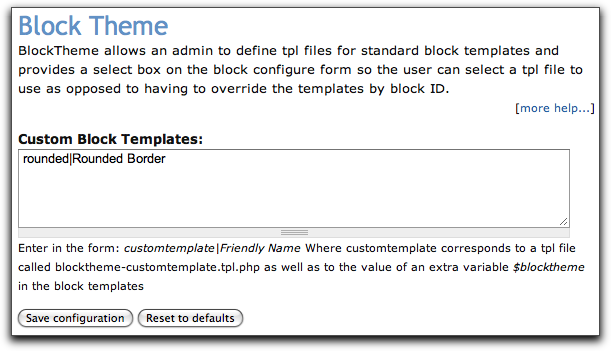
Next, you'll need to add some files to your theme. All of these files are available for download at the end of this article. First, put the "blocktheme-rounded.tpl.php" template in your theme directory. If you're using a sub-theme, you'll need to be sure the sub-theme has a block.tpl.php file as well. If not, copy the block.tpl.php file from the base theme into the sub-theme.
The "blocktheme-rounded.tpl.php" file is similar to a default block.tpl.php file with some extra HTML elements.
subject ?>
Then put the "rounded_borders" directory into your theme's "images" directory (if your theme doesn't have an "images" directory, feel free to create one). It is in this directory that the border images reside. I've included a 1-pixel grey border to get you started, although the images are fairly easy to recreate in different colors and thicknesses. You can even add drop shadows to the borders.
In order to link up the images with the new HTML elements, you'll need to place the "rounded_borders.css" file into your theme's "css" directory (again, if one doesn't exist, then feel free to create one).
If you decide to modify the borders, be warned that you may need to tweak some of the CSS in the rounded_borders.css file - particularly if you change the size of the image files or the thickness of the borders. That's a little beyond the scope of this article, but if you do need to tweak the CSS, pay particular attention to the "background-position", "height", and "width" values.
Finally, you'll need to add one line to your site's .info file. This tells your theme to load the "rounded_borders.css" file.
stylesheets[all][] = css/rounded_borders.css
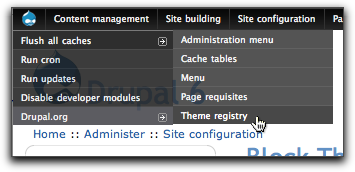
At this point, you absolutely must clear your site's cache (specifically, the theme registry) if you have the Administration Menu and Devel modules installed, then you can do this from the Administration Menu's Drupalicon menu item (all the way on the left).
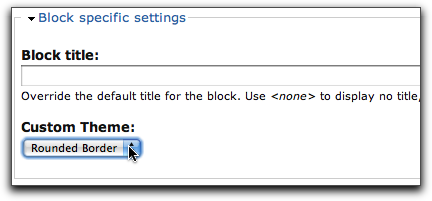
Superduper - you're all done with the installation. Now all you have to do it go into your block administration page and and click to "configure" a block that you'd like to apply the rounded border to. On the block's configuration page, select "Rounded Border" as the "Custom Theme".
Ta Da! You've done it.
If you're interested in learning how to create tabs with rounded corners, check out this article from A List Apart.
Comments
Followed these steps...and my
Followed these steps...and my theme disappeared! It seems the style.css is no longer being recognised. Plus my custom logo isn't loaded anymore either.
I've tried placing style.css in the main theme directory and the new css directory. I don't think I missed any steps from above. Any suggestions as to why this has happened?
On the up side, my user login module now had nice rounded corners...
What seems to be happening is
What seems to be happening is that the theme is only reading rounded-borders.css.
Adding my existing style.css content to rounded-borders.css restores the theme.
Alternatively, adding the rounded-borders content to style.css then adding:
stylesheets[all][] = css/style.cssto the info file also fixes it.
Is there a way to get Drupal to read both .css files?
My theme is based on bluemarine, dead simple.
You should be able to just
You should be able to just add both to your .info file - like this:
stylesheets[all][] = css/style.css

stylesheets[all][] = css/rounded_borders.css
-mike
wow, great post, i had no
wow, great post, i had no idea it was that easy. thanks for the tutorial i think this is awesome.
I've got this up and running
I've got this up and running now and it looks great. So much so that I'd like to extend the functionality if possible to cover other areas of my site.
I'd like to surround the page content in rounded borders as well. Do you guys think this might be possible with your module? What might I have to do to extend it in this way?
Guest (if that is your real
Guest (if that is your real name),
You can absolutely extend this to any other part of your site.
If you want to surround the page content, then edit your page.tpl.php and use the HTML and CSS included in the article as your guide...
-mike
Hi Mike, My name's Dave and
Hi Mike,
My name's Dave and I'm a developer based in London.
Ok cool, I'll check that out and let you know how it goes
Well, that was easy...! I
Well, that was easy...!
I simply copied the div tags from blocktheme-rounded.tpl.php, and placed them around the <?php print $content; ?> line in page.tpl.php.
Looks really good. I'll post the link when the site's up and running.
Great module this.
Thank you so much for this
Thank you so much for this post! I'd been working for several hours to try and figure this out.
me I couldn't make it work..
me I couldn't make it work.. first all my theme disappeared, then I adjusted everything adding the rounded block css into the style css and my theme came back.... but when I set the rounded corner custom block theme no rounder corners appear...... (whitejazz theme... recoloured by me, maybe that's why it won't work...)
I have tried enabling
I have tried enabling "rounded" for a block and it didn't display at all; however that was never really my intention. I have placed the div tags around the content section of <?php print $content; ?>, and have succeeded in making my my content section rounded. Thanks a lot for this contribution!
In addition I also have two question that someone might have the answer to or know where to get them.
1. Do you know how have each comment display a rounded corner just like the ones found here http://drupal.org/node/414526 ?
2. Is there a way to make individual stories (content type) have rounded corners, so that whenever a new one is created (and automatically posted to a certain node) they look like they are separated like the comments, instead of with horizontal breaks?
Thank you once again for this contribution, and your time spent developing this is very appreciated.
Robert
Robert, The answer to both
Robert,
The answer to both your questions is basically the same. Yes, you can surround both comments and nodes with rounded corners using the same technique. All you need to do it apply the technique to the comment.tpl.php and node.tpl.php template files.
-mike