
This article is also available in French from KolossalDrupal.
There's an incredible amount of functionality that can be provided by the Views module, especially when it is combined with intelligent use of Node Reference fields. When you relate your site's nodes with Node Reference fields, these relationships can be easily leveraged to create some very useful views.
I'm going to build a view for a sample music site. In the site, I have 3 related content types for "Band" nodes ("Black Eyed Peas", "Linkin Park", etc...), "Album" nodes ("Back in Black", "Bat Out of Hell", etc...), and "Events" (concerts, television appearances, etc...)
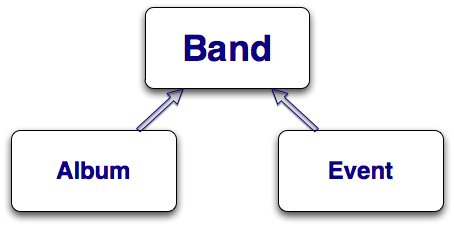
Each of these content types has only the minimum fields to demonstrate the Views functionality that is the subject of this article. For example, the "Event" content type doesn't have any location or date fields - they can be easily added at a later time.
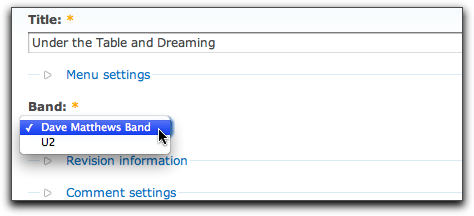
To associate the 3 content types, both the "Album" and "Event" content types have a Node Reference field that allow their nodes to point back to a "Band" node. For example, when a new "Album" node is created, the user is forced to select the appropriate "Band".
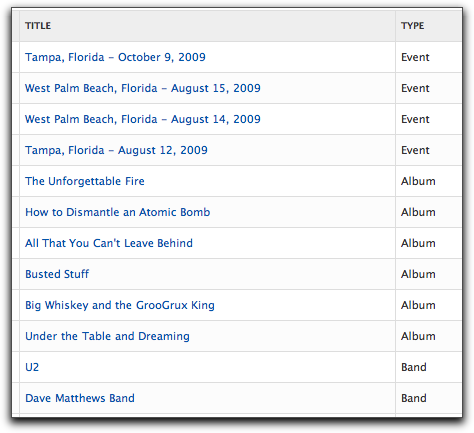
In order to make use of these content types, I went ahead and populated several nodes of each type so I have some data to work with when creating the view.
The goal of this article is to be able to create a page that displays a single band node along with all of its albums and events. Here's a quick sample of what I'm aiming for:
Band Info

[Band Name]
Albums
[Album 1]
[Album 2]
[Album 3]
Events
[Event 1]
[Event 2]
[Event 3]
There are several ways to accomplish this - Panels (context) and blocks (visibility) come to mind - but I'm going to use a method that utilizes only Views Attachments. Regardless of the method choosen, it's almost guaranteed that you'd have to create some views so why both with the extra overhead of additional modules and/or code?
A Views Attachment is simply a type of Views Display that gets attached to another View Display (usually a page display or a block display). Simplifying things, it can be thought of like this:
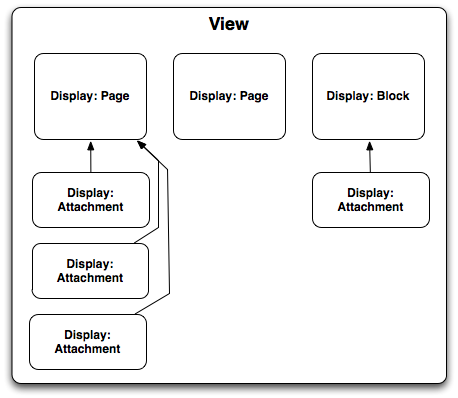
The diagram shows that Page and Block displays (as well as other types of displays defined by other modules) can have any number of attachment displays. These attachment displays can physically appear on the page either before or after the display it is attached to.
For this example, I'm going to create a view that has one Page Display (called "Band Page") and two Attachment Displays (called "Albums Attachment" and "Events Attachments"). The two Attachment Displays will be attached to the bottom of the "Band Page" so we end up with the desired outcome as outlined above.
As usual, you can download all the CCK types and view exports at the end of this article.
For the first step in creating the view, I went to the admin/build/views/add page and created a new node-based View called "band_info" with the following values on the "Defaults" display:
- Basic Settings
- Title: Band Info
- Arguments
- Node: Nid ("Action to take if argument is not present: Hide view / Page not found (404)")
- Fields
- Node: Title
- Filter
- Published: Yes
- Type: Band
Next, I created a new "Page" display and named it "Band Page" and set its path to: "band/%". Remember, the "%" is just a placeholder for the "Node: Nid" argument I set up in the "Defaults" display.
At this point you can save the view and check it out in the "Preview" pane by entering in a valid Node ID for a "Band" node in the argument field. The view should show only the band's name that is associated with the Node ID you provided as the argument.
Now for the interesting stuff. I'm going to create an Attachment display that shows all of the Album nodes for the Band specified by the Node ID in the argument. Remember, there's nothing all that special about Attachment displays. They're just like any other Views Displays except that you can attach them to other displays. To create the "Albums Attachment", I started by selecting "Attachment" from the display select box and clicking the "Add display" button.
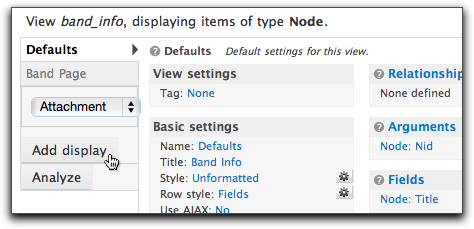
Initial setup for the new display is straight-forward:
- Basic settings
- Name: Albums Attachment
- Attachment settings
- Position: After
- Attach to: Band Page
Since this display is going to show a list of "Album" nodes, I want to set the "Node: Type" to "Album". When doing this, I have to be careful not to change the default settings for the entire View - I want to change the settings just for this attachment. To do so, I click to edit the "Node: Type" in the "Filters" section, then click the "Override" button so that I'm only modifying the current display and not the entire view:
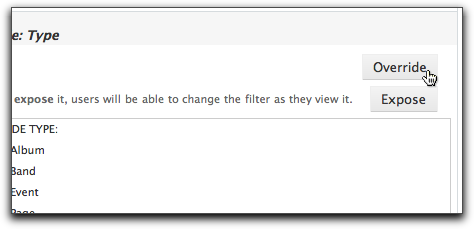
Once the setting is overridden, I can then safely change it to "Album" without worrying that I'm messing up the other displays. It is easy to tell when a setting is overridden: it is no longer displayed in italics in the display summary:
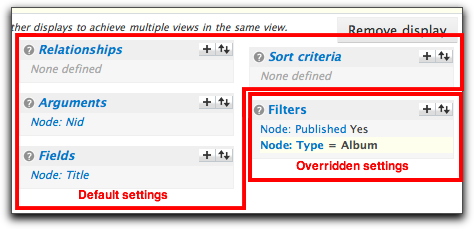
Here comes the tricky part: now that our display is going to show only Album nodes, how do you filter it by the Band's Node ID? With a "Relationship", of course! Remember, the Band and Album content type are related via a Node Reference field. We can utilize that relationship to filter the Album nodes. The first step is to add a new relationship to the "Albums Attachment". In this case, I'm going to add a "Content: Band" relationship. Before I do this, however, I have to ensure that I'm adding this relationship only to the Albums Attachment, not the entire view. This is a common source for mistakes. Take note of the "Relationships" section - notice how it is italicized? That means anything I add to it is actually getting added to the Defaults display - and all of the displays that inherit from it. I first need to click on the "Relationships" link and click the "Override" button.
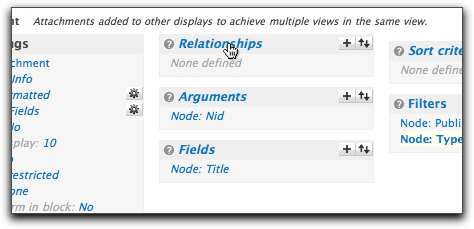
Once this is done, I know that I'm safely adding the relationship to only the "Albums Attachment" display. I'm going to add the relationship that links an "Album" node to a "Band" node - in this case, that is the "Content: Band" Node Reference field.
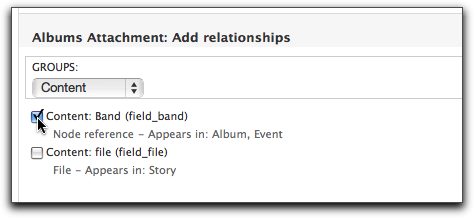
After adding the relationship, I'm presented with a couple of settings. The "Label" is used only to help identify the relationship as it appears in this particular view. When adding multiple relationships to a view, it is helpful to give them meaningful names. Luckily, Views does a pretty good job at assigning the default, so I'll stick with that.
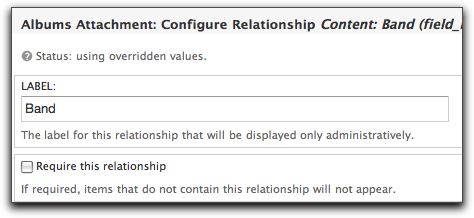
In this case, the "Require this relationship" option is not necessary because I know that the argument will filter out all but those Album nodes I want to see.
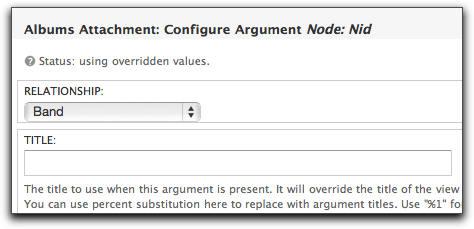
The final piece of the puzzle has to do with the "Node: Nid" argument. Since the "Albums Attachment" display is inheriting the argument from the "Band Page" display, I have to make sure that it is using it correctly. As it stands now, the display will try to filter the list of Albums with the incoming Node ID argument. This won't do much of anything since the incoming argument is the Node ID of a Band. I need to tell the view to use the argument to filter the Album nodes returned by the Band - using the Relationship I just set up. Turns out this is pretty easy to do.
First off, I need to click to edit the "Node: Nid" argument and then click the "Override" button so that my changes only affect this display. Then, I need to set the "Relationship" select box to "Band". This will effectively filter the Album nodes returned by their associated Band node's ID.
One final thing I did to the attachment to make it a little more user friendly was to override the "Header" setting and add the following:
Albums
This will simply display a nice header above the albums. Taking a quick look at the Preview pane with the appropriate Node ID for a Band, you'll see something like this:
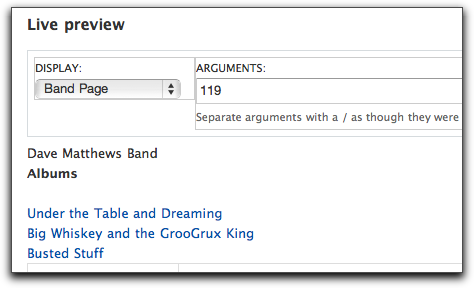
At this point, the "Albums Attachment" is just about done. You can add some additional fields, sorts, and display options, but the challenging part is complete.
The "Events Attachment" works exactly the same way. The main difference is that the "Node: Type" filter uses the "Event" content type, but everything else is analagous to the "Albums Attachment" display.
Putting everything together, the final view looks like this:
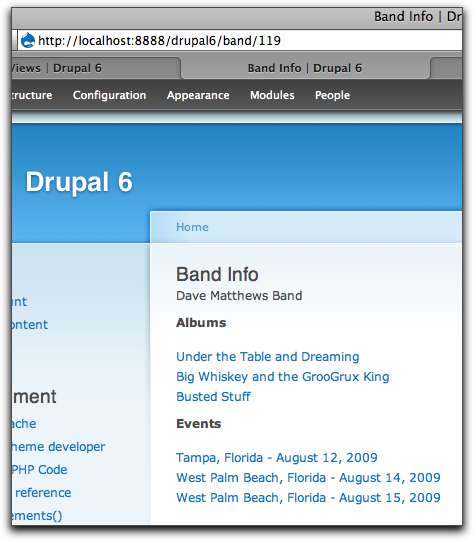
It's not too hard to imagine how you can utilize these tools to generate all sorts of interesting views of this same data. Perhaps an Album or an Event page that shows information from the associated Band node. Maybe add a new content type for "event location", then you can build a view that displays all events by location along with Band information for each event. The method outlined here is flexible enough to allow you to drill as far down into your data as you need.
Comments
A very good, clear article
A very good, clear article covering features that aren't documented well enough. I appreciate this. Cheers
Great article!
Great article!
I'd be interested to hear how
I'd be interested to hear how this differs from a similar solution created using the views_attach module. I implemented something using that module, but looking at it now, I'm really not sure how using that, rather than this method, is in any way preferable?
I have something along the lines of what Jeff sets up here: http://www.lullabot.com/articles/photo-galleries-views-attach
Nik, The views_attach module
Nik,
The views_attach module simply provides additional display plugins for views - it doesn't really deal with any of the "Relationships" stuff I covered. Views_attach provides an easy way to attach a view to different types of node content.
The method I showed sort of combines a regular node view (using the Node ID passed in as an argument) with the "attach" functionality of views_attach. It's basically two different ways of obtaining the same result.
-mike
Thx for this great how-to
Thx for this great how-to about a diffucult and not well documented topic. I love the depth of this piece; that you don't shy away from documenting EVERY step.
Thank you, so much!!! - I've
Thank you, so much!!! - I've stuck into the Views for more than a month and no tutorial on the net could help me to accomplish what you've done in this how-to - definetly the best one I've read on this subject!!!
However by understanding the subject better I still can't figure out how can I solve a problem of pulling data from one level deeper. To give an example, let's say we have the following hierarchichical structure: Bands -> Albums-> Songs. How can I obtain a certain Band and all its Songs? Is this possible to be accomplished using just Views? If you can give just an idea you'll really save me!!! Thank you again!
Andrew, It's actually fairly
Andrew,
It's actually fairly straight-forward:
1. Create a view and filter by the Band
2. Add a relationship to the Album
3. Add a second relationship to the Song - but when you add this second relationship, be sure to use the Album relationship in the settings area.
-mike
Hey thanks for this! Fairly
Hey thanks for this! Fairly clear to understand. I'm trying to do something similar.
I'm building a restaurant directory, and I've created a restaurant content type with taxonomies attached to it (price, geographic zone, cuisine type). I've also made a View with exposed filters so people can choose by drop-downs what sort of restaurant they're looking for. So if somebody chooses "Cajun", it will only show restaurants that have been tagged under "Cajun". Pretty simple.
However, we need to sell advertising in our directory, and what we want to happen is that when somebody selects "Cajun" an ad for a Cajun restaurant will appear above the search results. Or if somebody selects the geographic zone "North", an ad for the north side of the city will appear. Hope that's clear.
I've installed the Ad Module, and I've tweaked the default content type that it creates with the very same taxonomies I used for the restaurant content type (price, geographic zone, cuisine type). So for example, I have some restaurants created that are tagged under "Cajun" and I've made an ad also tagged under "Cajun". As I said before, we would want somebody to select Cajun from the drop-down, and that Cajun ad would show above.
So I've made an attachment solely for ad that will (hopefully!) appear. But I'm confuzzled on how to make a relationship between the taxonomies. Is it the same general idea as this tutorial?
Any help is worth 500 brownie points. Thanks!
I don't think you necessarily
I don't think you necessarily need to use a Relationship to accomplish this.
Why not just create a new view (either as a block or attachment) and grab the taxonomy argument from the page to filter for the correct ad...
-mike
related to #7 thanks a lot
related to #7
thanks a lot Mike!!! it works! - initially I've tried as you said but probably did something wrong and it didn't displayed me the songs. Afterwards I've created a new attachment and started to build the relationships from it - first one with the album and then the second one with the Band where I selected "Use a Realationship" with the first-created relationship. Then in the attachment's NodeID argument I've pointed to Band id - and voila!
My particular case is a bit different if talking in the "Band" terms - it is a one to many relationship between Album and Band, i.e. one Album can be related to more Bands - and the View I've created works correctly anyway. Views are great!
One more question Mike - how is it possible to add some custom code to a Generated View? My problem is that I need the obtained Albums/Song to be displayed as a Dropdown list with an event attached to it?
..and just one more :) - how a Views-generated page with a /% parameter can be added to the Main Navigation?
thank you again!
Andrew, The most
Andrew,
The most straight-forward way to add the "custom code" to your view that you're looking for is probably via a Views template file. See http://views.doc.logrus.com/group__views__templates.html for more info.
For your "Main Navigation" question - are you looking to hard-code a value for the argument? If so, you can just add the item to the menu via admin/build/menu. Otherwise I'm not sure what you're trying to do - how do you intend to set the argument?
-mike
Thnx! You spent some time
Thnx! You spent some time planning the tutorial, and it shows. Good use of images, too.
A minor point - you might consider a screen shot early on showing the node reference fields. Maybe some sample records showing how node id values link records together. Might help beginners.
Great job. Thnx again!
Kieran
thanks for your answers
thanks for your answers Mike!
regarding the Menu issue - ideally I'd like to have a link let's say: .../?q=band/ and when it is accessed - the nid of the first band from the view (let's say Bands are sorted in the View by date) to be passed as the argument to this link. When I'm already in the View I'd like to setup a custom pager to move between my bands using the same nid as the argument.
Probably it should be very difficult to be implemented the way I'm looking, so I think I'll use the admin/build/menu to add a hardcoded argument for the first Band.....
I can't get this to work. I
I can't get this to work.
I know this isn't a forum, but I can't get this to work, after five tries over two days.
The default displays are all good, but on creating the page 'Band Page' and the path band/%, I can never get any view. In the section below the Display Preview it shows the correct path (mysite/band/u2), but it won't display it in the view.
Here is the query:
SELECT node.nid AS nid,
node.title AS node_title
FROM node node
WHERE (node.status <> 0) AND (node.type in ('band')) AND (node.nid = 0)
Is something missing in the argument set-up that the node.nid is 0 in the query and not the value I put in the 'Arguments' section of the Preview pane?
Does pathauto and/or clean URLs have something to do with this not working?
Thanks
Jeff, The argument is not the
Jeff,
The argument is not the band's name - it is the Node ID of the band's node...
-mike
Thanks so much, Mike, for
Thanks so much, Mike, for replying so quickly and perfectly to an embarrassingly elementary question.
Jeff
Mike, sorry for so many
Mike, sorry for so many questions on this subject - beleive you can provide one more advice:
- By implementing the View as you described in your article, the Views built-in pager doesn't work anymore, is it because of the argument? How a paging solution could be added to such a View? Custom Pager doesn't work with it as well.
thanks a lot!
Andrew, I'm not sure where
Andrew,
I'm not sure where you're using a pager - in my example above, the result was a view displaying a single "Band" node along with it's associated Albums and Events.
That being said, I can't think of any reason why a Views pager wouldn't be working based on anything I've outlined...
-mike
Great work! I was just
Great work! I was just explaining how to use arguments to someone and then viola! I remembered about your article and it really helped make things a lot clearer.
One question about your set up. Don't you now have two versions of a particular band's info, one the original band node, and the other this view that gives the band's title plus its event and album info. How do you reconcile these in terms of searching on your own site and also folks finding your site through search engines? Are you "hiding" the original node somehow?
John Mc, There's only one
John Mc,
There's only one "version" of the node - just two ways of displaying it.
If you want to reconcile it, just change the view's path to node/% or use pathauto...
-mike
Absolutely great, This is
Absolutely great, This is exactly what I was looking for. Just one concern, I am going to be using Pathauto, will there be any issues for the views to get node IDs from URLs, or in this case, only system generated URLs are used.
Nope - there should be no
Nope - there should be no issue with Pathauto when using this method.
-mike
Thank Mike, You are right, I
Thank Mike, You are right, I tried it Pathauto, works like a charm.
Nice article, Mike. What I
Nice article, Mike. What I really appreciate is the fact that you kept it bare bones - not adding any unnecessary fields/nodes etc beyond what was needed to illustrate the point. Too many articles like this create some convoluted application where you spend half of your time figuring out what the application is doing, rather than what the point of the article was.
Hi Mike - I have a quick
Hi Mike -
I have a quick question about a particular scenario. Suppose that I wanted to show all the albums for every band when a band node id is not provided in the url. I understand that first I would have to change the "Action to take if argument is not present:" in the defaults section to be display all values. That works great - except that it will output all the band names before outputting all the ablums - ideally in this case I would like it to say something like "All Bands Albums". Can you recommend a possible approach for this?
Thanks.
John
John, That's a good question
John,
That's a good question and not one that I have an easy answer for.
I thought that I might be able to do a "display all values" when the Nid argument isn't present (on the albums attachment), but I couldn't figure out how to make it happen without also listing all the bands.
Maybe it is possible to do a redirect when the argument isn't present to a different page display that shows exactly what you're looking for?
The one sure way of being able to do it would be to modify the albums attachment's argument to "provide a default argument" when one is not present. In the default argument options, you would then select "PHP code" and then write a snippet of code that queries the DB for all of the bands' Nids. Then, format them as "1+2+3+4+..." and return that as the default argument.
Maybe someone else will be able to provide some additional options...
-mike
Very helpful article. I want
Very helpful article.
I want to display on album node picture of artist.
The picture is uploaded in the artist node.
Thanks
I was wondering how you would
I was wondering how you would go about addressing a relationship structure that has a third level, such as Band -> Album -> Song? A Song belongs to an Album, and an Album belongs to Band. If Band, Album, and Song are all nodes with their respective fields, how could you expand your example to add the third level of "Song" into this setup? Is it as simple as adding a reference between the Album and Song nodes?
Jayson, Yep, you should be
Jayson,
Yep, you should be able to just "chain" the relationships...
-mike
Yes you can chain the
Yes you can chain the relationship..First create a relationship between the band and the album using the nodereference field and second create a relationship between album and song using the nodereference field between album and song and in that relationship use the relationship that you previously created...Thats it...Great article....
Hi Mike - Thanks for
Hi Mike -
Thanks for taking the time to consider my problem. What I ended up doing was creating two views for the two different scenarios. I may come back and revisit this at some point to see if there isn't a more elegant solution - but for now this does the trick.
Thanks again for a great article.
John
Thanks for such a detailed
Thanks for such a detailed description of how to do this!
This may or may not be relevant for some people -- but I accomplished what I think may be the same thing without doing anything with Views, by using Corresponding Node References. I had the same kind of content type structure. What I did, to match to your structure, was to create a node reference in Band to Album, and another to Event -- both allowing multiples. Then, in Album and Event, create a node reference to Band. Finally, go into admin/settings/corresponding_node_references and check off the references that should "listen" to each other, so that when you select an Album within a Band node, the Band node ID will get set in the Album node. And vice versa, if you are editing an Album node.
The albums and events display as titles and links when viewing the node and you can click through to the child nodes. However, if you wanted to display more fields from the child nodes, I do think that would need to be done with more Views work.
But if you only need to display the title of the child node and a link, then CNR with node references on both sides may work for you.
Also, I used Popups: Add and Reference, so that now you can enter everything from within the Band node. Click to add another Album, and it will present a popup album_node_form. Very nice.
Hello, I have url of band -
Hello,
I have url of band - domain.com/artist/[name-of-band]
and I would like to have view of bands albums with url domain.com/artist/[name-of-band]/[name-of-album]
now I can do that view with url domain.com/artist/[id-of-band]/[album]
the view has argument node ID - default argument - Node ID from URL with that relationship
thanks for help
Ankerek, By the time you get
Ankerek,
By the time you get down to one album, you really just want to see the node page. All you really need to do is get the aliases to have [name-of-band] in them, which is probably possible with Pathauto. An album usually only has one artist.
ankerek, You can do this one
ankerek,
You can do this one of two ways:
1. use the PathAuto module
2. Rework the views so that the arguments take the name of the band and the name of the album
-mike
mike, 1. how to do paths of
mike,
1. how to do paths of views by pathauto?
2. if I use argument - node name, then default argument - node ID from url doesnt work...
ankerek, Good point about
ankerek,
Good point about pathauto - didn't think about that.
For the argument option, you'd have to give up the benefit of using a default argument - or write some custom code to find the Node ID based on the band name (or album title).
-mike
it's a pity :-(
it's a pity :-(
ryanprice, I dont understand
ryanprice, I dont understand you
Hi anerek, the url
Hi anerek, the url domain.com/artist/[name-of-band]/[name-of-album] should be a node and not a view..because and album page is just information about that album as for my understanding. So u dont need a view, and u can achieve that kinda url by using pathauto. I have done a very similar kinda project.
Prashant, yes but I'd like
Prashant, yes but I'd like show on artist page list of few (4) albums and if there are more than 4 albums a link with url to page with albums will show...
Hi ankerek, Will the artist
Hi ankerek,
Will the artist page be a node page?? And that page should dsiplay 4 albums in that page and if there are more that 4 albums there will be a link to all the albums right?? what will be the url for this albums page?? will it be domain.com/artist/[name-of-band]/album
Prashant, yes the url will be
Prashant, yes the url will be domain.com/artist/[name-of-band]/albums (by views)
Hi ankerek, what you can do
Hi ankerek,
what you can do is something like this:
The views for the album page will have the following filters. node:type=album
now create a relationship using the noderefereference field between the album and the artist..
Now in argument select Node: title and use the relation that we had created earlier in this argument.
Add a page display: and path should be something like : artist/%/album
Now when u go to a page say for artist eminem: domain.com/artist/eminem/album
then this will display all the album that have reference to that artist..
I hope this works...
Prashant, I have tried it, it
Prashant, I have tried it, it works, but it isnt that what I really want... I need to display that view on artist page - to list few albums of that current artist a than show the link domain.com/artist/eminem/albums
To show that view in the
To show that view in the artist page u can do a few things..you can embed the view in the artist node by creating a new tpl for the artist content type
http://drupal.org/node/246742
the other option is to use a module viewfield http://drupal.org/project/viewfield
It allows to insert views in a node...
You can add the more link using some php code...
Prashant, I know how to show
Prashant, I know how to show that view in template, but that argument (node name) doesnt work... it doesnt show albums, it show nothing... argument (node ID with default argument - node ID from URL) works, but the url is domain.com/artist/[ID-of-artist]/albums
Oh..I see what you
Oh..I see what you mean...well in that case for the embedded view u can use node:Nid as an argument and use a the relationship.. and in Action to take if argument is not present: select provide default argument and select Node ID from URL
for the page view u can override the argument to Node: title
It doesnt work... the url of
It doesnt work... the url of more link is - domain.com/artist/[ID-of-artist]/albums
it takes argument of block
ankerek, does the view using
ankerek,
does the view using [name-of-artist] work otherwise? you could use some PHP in the argument handling code to get a default.
if arg(0) is 'node' and arg(1) is numeric
$node = node_load(arg(1));
return $node->title;