Reintroducing Drupal core's Views "Combine fields filter"
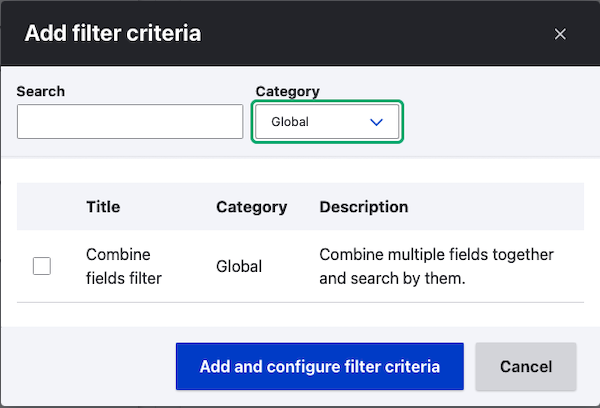
I was recently reminded of a Drupal core feature that I hadn't used in a long time - and was pleasantly surprised at how useful it is.

I was recently reminded of a Drupal core feature that I hadn't used in a long time - and was pleasantly surprised at how useful it is.
Gregg Marshall's Mastering Drupal 8 Views is one of the (I can only assume) many Drupal 8-focused books that will be released in the coming months. It is a very good deep dive into many of the hidden corners of the Views module, albeit with an interesting format. Not completely structured like a typical how-to software book, Gregg takes a bit more of a novel approach (pun intended) - he takes the reader on a journey through the Views module through the eyes of Lynn, a small business owner (Lynn's cat and Drupal consultant also have prominent roles). While some
If you have a Drupal 7 view with more than one attachment display, it is not super-obvious how you can reorder the displays. When you create a new attachment display, you can choose the display to attach the attachment display to as well as the position ("before", "after", or "both").
But what if you need to attach two attachment displays "before" another display - how can you control the order of the two attachment displays.
it's actually quite easy once you know how - in the view's "edit view name/description", there is a "reorder displays" option. Click it and behold!
Mapping address data in Drupal can be confusing, if only because of the great number of contributed modules available that involve online maps. Picking the right module (or combination of modules) is challenging - especially for site builders who are new to mapping in Drupal. In this tutorial, we'll utilize the popular and well-supported [Geofield](http://www.drupal.org/project/geofield) module as one of the key ingredients in the common task of entering address data and having it displayed on an interactive map. This tutorial contains step-by-step instructions for accomplishing this task, as well as a screencast demonstrating all of the steps.
I rencently spent a few quality hours with the Views interface trying to figure out how to add an Organic Groups Group ID contextual filter to a Views display and have the display's title overridden based on the value of the contextual filter. Actually, it's easy to do if you don't mind having the actual Group ID integer in the title. But, like most people, I actually wanted the Group name in the title of my display. It took me more time that I'd care to admit, as well as some guidance from the most excellent maintainer of the Organic Groups module, Amitai Burstein, but eventually, I discovered a simple solution that didn't involve additional relationships, contextual filters, fields, or trickery. Well - maybe not the "trickery" part. The solution involved what I consider to be a previously undocumented feature (at least to me!) of the Views module.
At Florida DrupalCamp 2013, I presented a session (video included) that demonstrated how to utilize the Feeds, Feeds Tamper, Address field, Geofield, and other modules to create a fully-functional website for searching for Farmers Markets anywhere in the United States. While the session's intent was to inspire people as to what Drupal can do in a very short amount of time, this blog post will focus on the details of the process.
As the explosive growth of Drupal continues, so does the eco-system of vendors and products around it. Included is the plethora of Drupal books that continues at a somewhat unbelievable pace. It seems that there are at least two to three new releases each month. Unfortunately, in the rush to quench the tech community's thrist for Drupal knowledge, sometimes less-than-stellar books are being served up before they're fully baked (cooking pun #1).
Turns out there is no filter that asks wether or not an imagefield (or filefield) has a value. I came across this tip on Drupal.org. The recommendation was to use a relationship, and then choose "Require this relationship" to act as a filter. Pretty cool.
So assuming your imagefield is just called "Image", here is the walkthrough:
When adding a field to a content type, it is tempting to create a new field, and to assign it a name so unique that it could never possibly clash with the names of fields you may create in the future (at least in that particular Drupal installation). After all, most if not all Drupal developers have examined the field tables and columns in a Drupal database — in an attempt to determine everywhere that the field data is stored, and anything else in the database that can affect it — but have been frustrated when field names are similar enough to be confusing.
Creating a well-organized, content-heavy website is difficult. Creating one that is also sustainable is even trickier. It's easy to keep adding features to a web site without considering how they fit into the overall plan until you get to the point where things start getting out-of-hand and site maintenance starts becoming a real issue (blame Drush for making it so darn easy to add new modules!)